
Silent Killer Simulator Hideout and Black Market Guide
The Hideout is your base between contracts in Silent Killer Simulator. Use its sale area, computer, armory, and Job Board to turn in your haul and prepare for the next job.
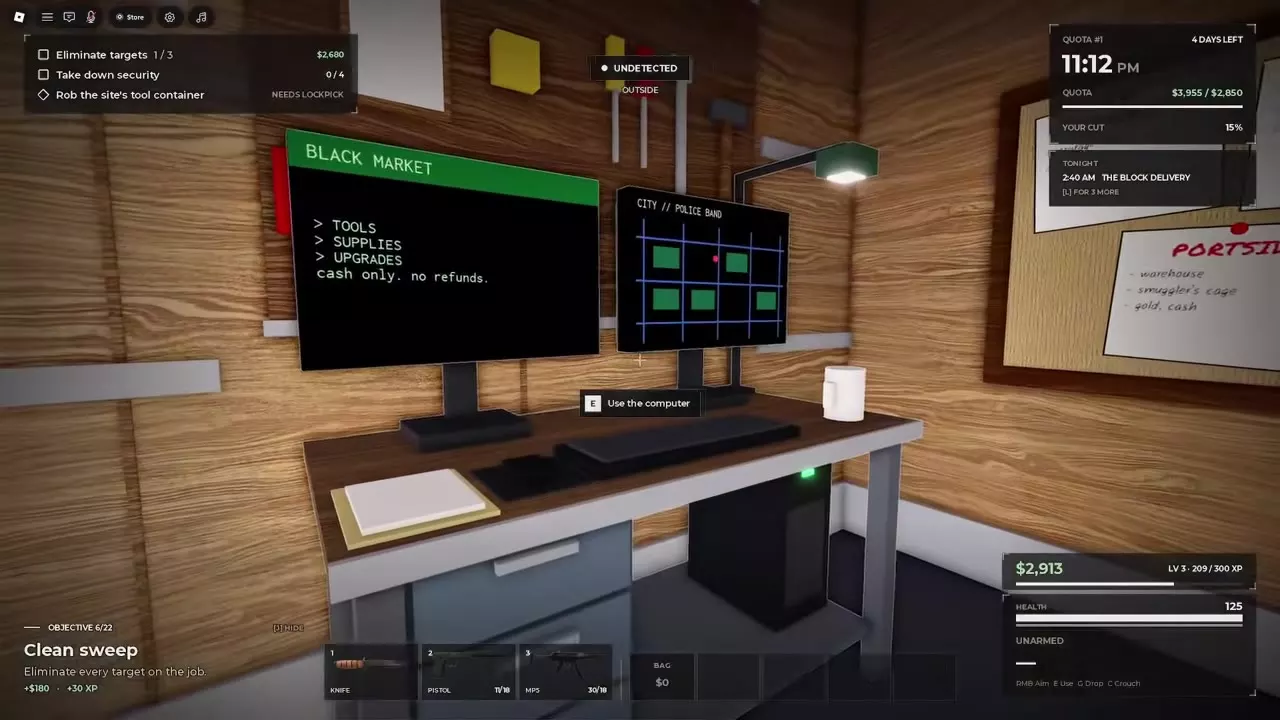
Choose Head Home on the truck’s Job Board to return to the Hideout. Use the yellow Sell Crate and its lever for cargo, the Job Board for your next contract, and the computer workstation to open Hideout.OS. The Black Market screen is at the truck’s computer workstation.
Hideout Facilities
After a contract, select Head Home on the truck’s Job Board. At the Hideout, find the station that matches your next task:
- Yellow Sell Crate: Deposit bodies and loot, then use the adjacent Pull to Sell lever.
- Computer workstation: Open Hideout.OS to review equipment, purchases, upgrades, and progress. The City // Police Band display is beside the Black Market screen.
- Armory: Browse the weapon display, including the Knife, Silenced Pistol, MP5, SPAS-12, M4A1, and AWM.
- Job Board: Preview destinations and choose the next contract, or select End the Night when you are ready to finish the night.
Black Market and Hideout.OS
Find the Black Market screen at the computer workstation inside the truck. On PC, approach it and press E at Use the computer to open Hideout.OS. You can also access Hideout.OS from the truck computer at a contract site.
| Menu | Use |
|---|---|
| Tools | Weapons and mission tools |
| Supplies | Consumables |
| Upgrades | Character improvements |
| Player Stats | Player statistics |
| Challenges | Objectives and rewards |
| Robux Store | Premium offers |
Select an item to see its description, price, and any level requirement before buying. The Black Market sign says Cash only and No refunds; premium offers display their Robux prices separately.
Use mission tools for locks, hacking, and safes, or check supplies for ammunition, healing, and other consumables. The upgrades guide helps match a purchase to your current bottleneck. For challenge objectives and first-time rewards, open Challenges or see Town challenges.
Sell, Prepare, and Pick the Next Contract
Sell your haul first so you can use the proceeds when preparing. Drag bodies from the truck to the yellow crate, empty your bag at the crate, and press E at Pull to Sell. Check Your Cut for the cash credited to you. See how to sell bodies and loot for the full process.
Review your owned equipment and use the computer to buy what the next job needs. Check weapons and stats when choosing a weapon.
When you are ready, press E at the Hideout Job Board and select a destination. Check its objectives, available departure action, and any Buy In. Town offers Drive There · Free after First Job. Use the same board’s End the Night option when you are finished for the night. See the Job Board guide for choosing a contract and run progression for starting the next night.