
Silent Killer Simulator Stealth and Camera Guide
Read the detection and access indicators as you move through Silent Killer Simulator, and act quickly when a camera starts recording.
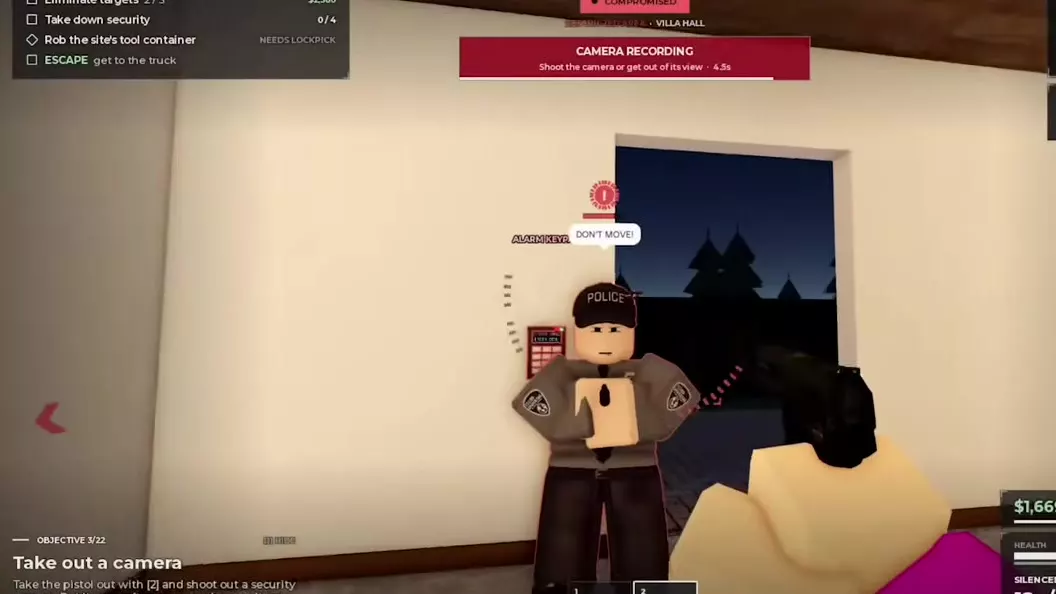
Undetected, Suspicious, and Compromised describe detection; Restricted Area and Cleared describe access. When CAMERA RECORDING appears, leave the camera’s view or shoot it before the countdown ends.
Detection, Movement, and Area Access
Read the detection status at the top of the screen alongside your location and outfit.
| Indicator | Meaning |
|---|---|
| Undetected | You have gone unnoticed |
| Suspicious | Something has drawn attention |
| Compromised | You have been exposed |
| Sneaking | Your current movement state |
| Restricted Area | The area restricts your access |
| Cleared | You have access to the area |
These indicators describe different things. You can be Undetected and Sneaking while still in a Restricted Area. At the Building Site, for example, the Concierge’s Blazer leaves the area Restricted, while Builder’s Hi-Vis changes it to Cleared. Check the area label again when you enter a different location.
After a suspicious encounter, moving away or leaving a camera’s view can restore Undetected. If guards identify you, watch for red exclamation marks and pursuit.
Avoid Drawing Attention on Your Route
Holster your pistol after using it: someone who sees you holding it can become suspicious. Choose an open entrance when available, because guards can hear a window being kicked in. Watch people’s sightlines before drawing or firing; even a Silenced Pistol can lead to Suspicious or Compromised if people or cameras see the shot.
Look around a downed NPC before moving on. BODY FOUND and MAN DOWN signal a discovery; a raised phone or REC marker identifies someone recording the scene. Respond to the active warning before continuing your route.
Camera Recording and the Camera Tutorial
When CAMERA RECORDING appears, use the remaining countdown to get behind a wall, around a corner, or otherwise out of the camera’s view. Near the Villa, you can drag a body behind the fence to break the camera’s line of sight. Leaving its view can clear the warning and restore Undetected. You can also shoot the camera before the timer ends.
Take out a camera
When the tutorial objective is active:
- Press 2 to draw the pistol in the tutorial loadout.
- Shoot a security camera.
- Holster the pistol before someone sees you holding it.
Completing the objective awards $180 and 30 XP. The next tutorial objective is Pocket something.
Use the Town power window
Cutting power at the Town Service Yard disables affected cameras for 60 seconds. Use that window to pass the Mill House Garage camera without shooting it, and resume watching for cameras when power returns. The security guide covers the panel and its interaction.
For preparation, the Camera Jammer unlocks at Level 4 and costs $720 under Supplies on a Hideout or Escape Truck computer.
Witnesses, Alarms, and Disguises
If a witness is still filming, approach before the REC countdown ends and press E when Take their phone before it’s posted is available. Taking the phone stops that upload; another witness can still raise an alarm. See alarms and witnesses for the response after a clip is posted.
A disguise can change whether an area is Cleared, so check both your outfit and the area label when planning a route. Find outfits and their known access in disguise locations. To reduce discoveries around a body, use the body hiding and blood cleanup guide.